Here are some new products announced by Apple in WWDC 2016:
1. iOS 10
iOS 10 Preview
Devices supported:
iPhone 5 and later iPhones
iPad 4 and later iPads
iPod Touch 6
List of iOS 10 Compatible iPhone, iPad, and iPod Touch Models
2. OS X -> macOS
macOS Sierra Preview
3. watchOS 3
watchOS 3 Preview
4. Swift Playgrounds
Swift Playgrounds app for iPad
5. App Development with Swift
iBook - App Development with Swift
More Information:
Everything Apple announced at WWDC 2016 in one handy list
蘋果WWDC 2016新品總整理
蘋果 2016 WWDC:Siri、Apple Maps、iMessage、通知通通開放 API!
內部融合大團結!iOS 10 這次不推創新,只求所有第三方 App 與 iOS 能綁得更緊密~
蘋果取巧地讓開發者為 iOS 10 原生 App 設計新功能
Showing posts with label news. Show all posts
Showing posts with label news. Show all posts
Tuesday, June 14, 2016

Friday, April 8, 2016
Monday, March 28, 2016
UIButton - Selector Warning (Update with Swift 3.1)
Update:
May 1, 2017:
Swift 3.1 with Xcode 8.3.2.
May 29, 2016:
The class name in the selector may be removed. Use #selector(buttonPressed) instead of #selector(ViewController.buttonPressed) for code simplicity.
On March 21, 2016, Apple released Xcode 7.3 with Swift 2.2. This new version of Swift is the first official release after the programming language became open source on December 3, 2015. The official Swift.org blog says that 212 non-Apple programmers have contributed to this release. Below is the first issue I face with Swift 2.2.
After I updated Xcode to Version 7.3, a warning appears with the UIButton code I normally use:
A warning is shown in front of the line number:

If I ignore the warning and continue to build the code, the UIButton still works perfectly.
By clicking the warning triangle, the warning description says that Use of string literal for Objective-C selectors is deprecated; use '#selector' instead.

Select the Fix-it Replace option.

Then the warning is disappeared as below:
button.addTarget(self, action: #selector(ViewController.buttonPressed), forControlEvents: UIControlEvents.TouchUpInside)
Update May 1, 2017 (Swift 3.1):
Update May 29, 2016 (Swift 2.2):
Remove the class name in the selector: #selector(ViewController.buttonPressed)and the complete UIButton code now becomes:
Here is more explanation about the modification of Objective-C selectors in Swift 2.2:
Referencing the Objective-C selector of a method
More Information about modifications in Swift 2.2:
Swift 2.2 Released!(Official Swift.org blog)
Reference:
UIButton - Update button label when pressed
May 1, 2017:
Swift 3.1 with Xcode 8.3.2.
May 29, 2016:
The class name in the selector may be removed. Use #selector(buttonPressed) instead of #selector(ViewController.buttonPressed) for code simplicity.
On March 21, 2016, Apple released Xcode 7.3 with Swift 2.2. This new version of Swift is the first official release after the programming language became open source on December 3, 2015. The official Swift.org blog says that 212 non-Apple programmers have contributed to this release. Below is the first issue I face with Swift 2.2.
After I updated Xcode to Version 7.3, a warning appears with the UIButton code I normally use:
let button = UIButton()
.
.
button.addTarget(self, action: "buttonPressed", forControlEvents: UIControlEvents.TouchUpInside)
A warning is shown in front of the line number:
By clicking the warning triangle, the warning description says that Use of string literal for Objective-C selectors is deprecated; use '#selector' instead.
Select the Fix-it Replace option.

Then the warning is disappeared as below:
button.addTarget(self, action: #selector(ViewController.buttonPressed), forControlEvents: UIControlEvents.TouchUpInside)
Update May 1, 2017 (Swift 3.1):
import UIKit
class ViewController: UIViewController {
override func viewDidLoad() {
super.viewDidLoad()
let button = UIButton(frame: CGRect(x: 0, y: 0, width: 200, height: 40))
button.center = view.center
button.setTitle("Press", for: UIControlState.normal)
button.setTitleColor(UIColor.blue, for: UIControlState.normal)
button.setTitleColor(UIColor.cyan, for: UIControlState.highlighted)
button.addTarget(self, action: #selector(buttonPressed), for: UIControlEvents.touchUpInside)
view.addSubview(button)
}
func buttonPressed() {
print("button pressed!!")
}
}
Update May 29, 2016 (Swift 2.2):
Remove the class name in the selector: #selector(
override func viewDidLoad() {
super.viewDidLoad()
let button = UIButton(frame: CGRectMake(0, 0, 200, 200))
button.center = view.center
button.setTitle("Press", forState: UIControlState.Normal)
button.setTitleColor(UIColor.blueColor(), forState: UIControlState.Normal)
button.setTitleColor(UIColor.cyanColor(), forState: UIControlState.Highlighted)
button.addTarget(self, action: #selector(buttonPressed), forControlEvents: UIControlEvents.TouchUpInside)
view.addSubview(button)
}
func buttonPressed() {
print("button pressed!!")
}
Referencing the Objective-C selector of a method
More Information about modifications in Swift 2.2:
Swift 2.2 Released!(Official Swift.org blog)
Reference:
UIButton - Update button label when pressed
Friday, December 11, 2015
How to Learn Swift without a Mac - IBM Swift Sandbox
Is it possible to learn the Swift programming language without a Mac or Xcode?
Now there is a simple way to learn Swift free online.
IBM Swift Sandbox has made it possible!!
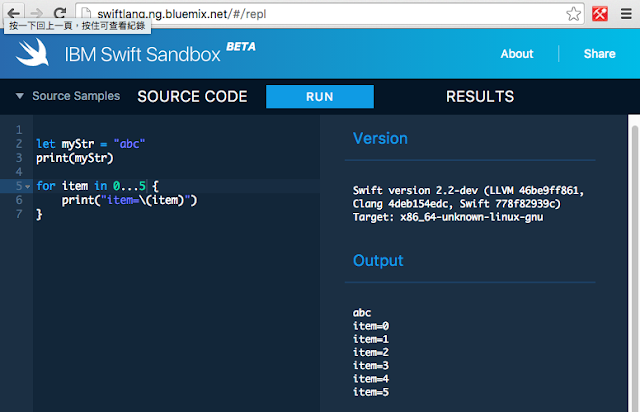
Why not go to the IBM Swift Sandbox page now?
Simply write your Swift code in the left side of the page and click the Run button.
Immediately you will see the output at the right side.
This web service is with the latest 2.2 version.
References:
Official Swift Online Document
Relative posts (Swift Syntax) on this blog
Apple Releases Swift as Open Source
Now there is a simple way to learn Swift free online.
IBM Swift Sandbox has made it possible!!

Why not go to the IBM Swift Sandbox page now?
Simply write your Swift code in the left side of the page and click the Run button.
Immediately you will see the output at the right side.
This web service is with the latest 2.2 version.
References:
Official Swift Online Document
Relative posts (Swift Syntax) on this blog
Apple Releases Swift as Open Source
Saturday, December 5, 2015
Apple Releases Swift as Open Source - December 3, 2015
Apple Releases Swift as Open Source - December 3, 2015
swift.org
Swift Programming Language Evolution says the upcoming release dates:
Swift 2.2 - Spring 2016
Swift 3.0 - Fall 2016
Apple 兌現承諾,Swift 語言已成開源
Updated December 8, 2015:
Craig Federighi talks open source Swift and what's coming in version 3.0
一向搞「小圈圈」的蘋果為什麼選擇將 Swift 開源?
Swift is poised to take over iOS development as Objective C tanks in popularity
swift.org
Swift Programming Language Evolution says the upcoming release dates:
Swift 2.2 - Spring 2016
Swift 3.0 - Fall 2016
Apple 兌現承諾,Swift 語言已成開源
Updated December 8, 2015:
Craig Federighi talks open source Swift and what's coming in version 3.0
一向搞「小圈圈」的蘋果為什麼選擇將 Swift 開源?
Swift is poised to take over iOS development as Objective C tanks in popularity
Saturday, June 28, 2014
Swift Information 關於Swift的資訊
The Swift Programming Language
https://developer.apple.com/library/prerelease/ios/documentation/swift/conceptual/swift_programming_language/index.html
採用共筆翻譯的方式,整個翻譯團隊在 9 天內完成了近 670 頁的 Swift 語言文檔翻譯工作
http://technews.tw/2014/06/13/github-the-swift-chinese-book/
Swift guide - chinese version
http://www.swiftguide.cn/
用Apple全新App開發語言Swift,4小時做出Flappy Bird遊戲http://www.ithome.com.tw/news/88381
Flappy Bird source code
https://github.com/fullstackio/FlappySwift
Chris Lattner:Swift 编程语言首席架构师
http://blog.jobbole.com/70139/
苹果新编程语言Swift仅耗时4年完成开发
http://tech.163.com/14/0605/03/9TUR3RNN000915BD.html
程式語言進化鏈的頂端:為什麼說蘋果的 Swift 正在顛覆整個網路生態?
http://tw.gigacircle.com/587858-1
蘋果SWIFT語言為何如此受歡迎?
http://blog.palapple.com/2014/06/swift_578.html
Swift Resources
https://github.com/Lax/iOS-Swift-Demos
=============================
Update 2015/12/5
Apple Releases Swift as Open Source - December 3, 2015
swift.org
Swift Programming Language Evolution says the upcoming release dates:
Swift 2.2 - Spring 2016
Swift 3.0 - Fall 2016
Apple 兌現承諾,Swift 語言已成開源
=============================
Update 2016/9
App Development with Swift
Subscribe to:
Posts (Atom)